Infrastructure first
After finishing the contents of my first Godot tutorial video mentioned in the previous post, I set to add my own to ideas to my game. My genre was still not fixed, so I decided to go with the flow and add something that would be needed anyway: a Settings menu. This is a very highly not recommended path as far as I know. Often the best is to work our your “gameplay loop” first. That is the actual gameplay the player will experience. I know, the startup menu will pop into their face first, but they won’t play for that exactly. My intuition said “you will need this anyway”, so I jumped in and made my very basic Control settings menu. You can set up a baseline setting in the Godot project settings too, but I wanted the traditional way, where you can change what keys you want to use. According to my experience, it’s part of almost every game. If not, that can be annoying to some.
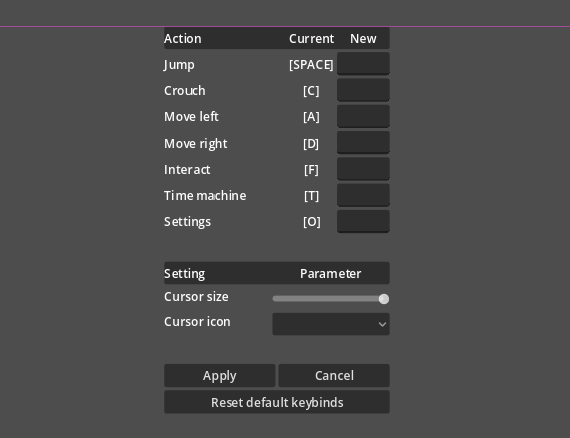
From this point, I called my method to myself as “infrastructure first”, since I started to work out parts of the game, that would serve as a foundation, not actual gameplay. It is risky, because one may put in lots of work without having any visible progress. It can easily degrade motivation. This is why the gameplay loop first is recommended. But I trusted I would not give up so easily.
After finishing the menu, I watched some more tutorials, so I could get some more ideas about what to implement. Tips, what to avoid, best practices, what engine is good for what genres (I was a bit sceptical about using Godot yet). Among the dozens of YouTube tutorials only a few piqued my interest. For example, one was about how to create an inventory system. Since my big plan was to someday make an RPG, I knew I would need that knowledge. Though my first target was something of smaller scale, beginner friendly, like a Mario, I thought I would just learn some bits that will be relevant later. It can’t hurt to have insight early on. This thinking also fit the infrastructure first method I now stick to.
This inventory creation was especially interesting, as it taught me lots of basic stuff I had no idea about.
For example @export variable is a kind of variable that is exposed in the editor, so you can kind of not hardcode a setting. It helps with scalability, which is very important. It also taught me how to use classes. They are like a foundation you build on. For example, you can make a foundation that can be reused to build many houses. It’s a shared foundation. Not sure if that is how one would define it, but this is how I internalized. It’s important that classes can be accessed from elsewhere, from another script.
My inventory at this point showed a frame with slots, where I could drag and drop items. Items were just icons basically with an attached object that contained data about what it is. These objects in Godot are .tres files. Once you made one, it’s easy to copy-paste and repurpose. A sword, a bow, boots. Just change the data behind. They can become cumbersome though as you get several. They scale badly.
The video I mentioned about the inventory creation:
The truth about tutorials
Tutorials are often there to teach you something with a very specific framing, not the best possible solution. That is impossible. The creators can have the best intent, but the best solution depends on the situation. A tutorial just shows the basics or a concrete solution for a concrete problem. Your problem will possibly be a bit different. I mean to say, you can’t just watch something and take it for granted, that the shown way is the way you must follow. Later you may even realize that although what they talked about was useful in the beginning, it helped to understand, but now its obsolete for your progress. For example, it turns out they showed a method that is easy to understand for beginners, but not well scalable. The best you can do is to experiment, play with the variables and see how they affect the results. Basically, try it out yourself. But just changing the variables is not enough, you also need to add.
Knowledge debt
The commands were still cloudy. I did not know what did what, where to find certain functions in the interface, or what functions were available in the first place. This is where AI came into the picture. I used it to some extent to brainstorm, but never to help with coding. GPT became my next tutor. Previously, I used to search forums and documentation for answers, but this time, it seemed like I had a faster way to handle it. My standpoint was that I wanted to learn it, not just make it (which I still hold). AI can do far more than just help a little though. You can easily end up with implementation ahead of understanding: knowledge debt.
Knowledge debt is when you use something and possibly even understand what it does, but you could not yet create it yourself because you haven’t fully grasped it. For example, you can ask what does a single command mean or to generate a code for a function. Those are totally different levels of use. To stick to my previous statement, I went with just asking about single commands at a time. It was a different language than I was used to, I had to realign some basics, like how an if-then statement or a for loop looks in Godot Script.
Later I became a bit bolder and asked for whole function blocks at a time. I carefully read and analysed the results, so I would understand them. I thought it would be enough, but as I accumulated more, I felt the debt more and more. When you get to know something new, it needs practice and a few good sleeps to integrate into your brain. With time and practice the logic clicks and the mental map builds. Then you start to know what is where in your project and what your functions do.
I tried progressing and learning as fast as possible, and I was in debt for sure. The other route would have been to just let the generated functions do their job and progress to the next task. I cannot side with that mentality. It can help first, but in the long run your project grows and so does the importance of having that understanding and mental map of the structure. You need to understand what you create!